1. What is the game
Pigeon Post Game is a mission-based strategy game built around your Rare Pigeons cards. You log in with your Counterparty address, the game detects the pigeons you own, and you use those pigeons to launch world missions between cities.
Each pigeon has gameplay stats. Each route has distance, time, and reward implications. Active regional events can increase or reduce the value of a flight. Good route selection, good timing, and good pigeon choice are what separate casual flying from efficient grinding.
2. Getting started
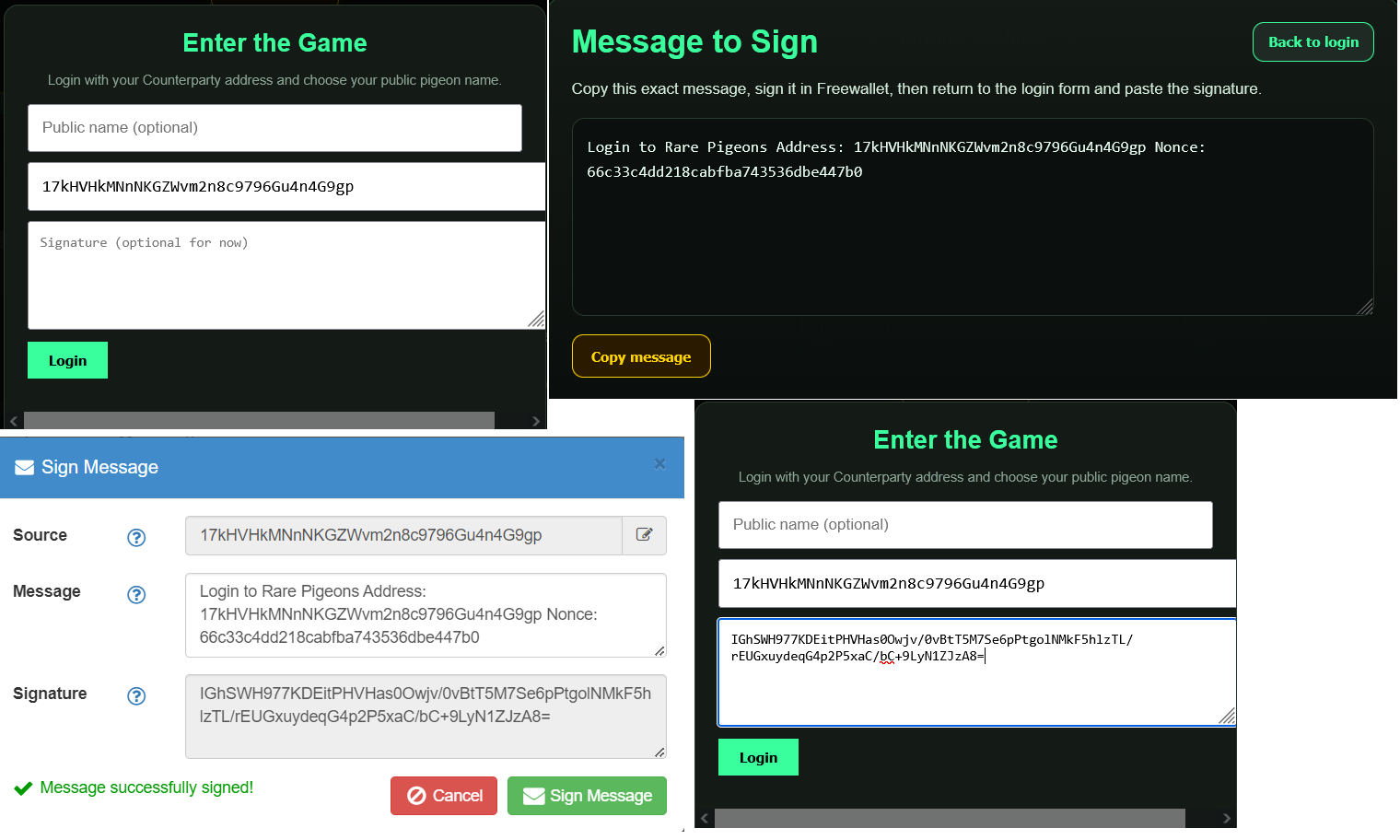
Enter your address
Open the game and enter your Counterparty-compatible address. You can also choose a public username.
Sign the login message
Copy the message shown by the game, sign it in Freewallet, then paste the signature into the login form.
Load your pigeons
After login, the game loads the Rare Pigeons cards held by your address and makes them available for missions.
3. What each screen block does
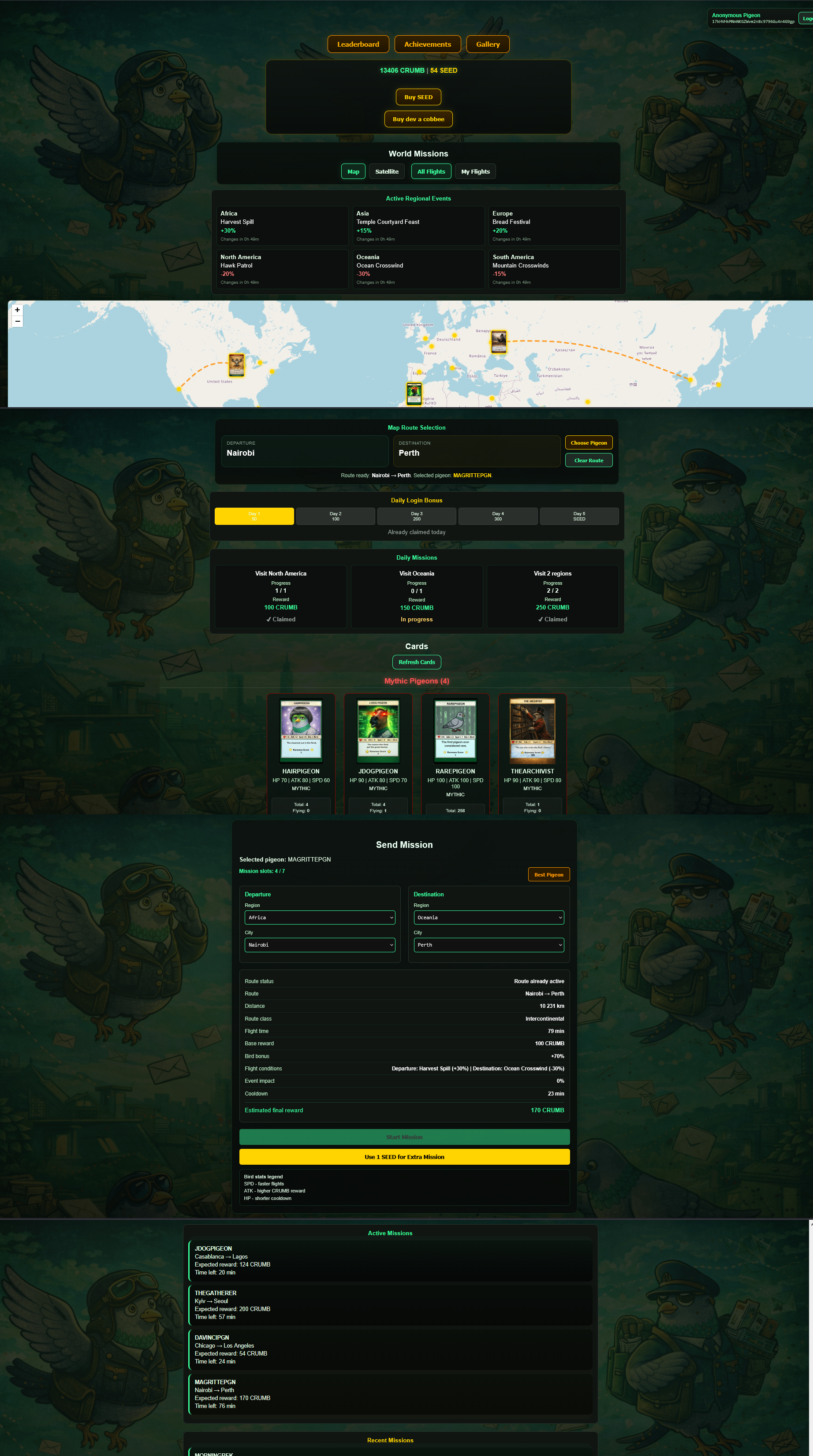
This section explains every major block on the game page so a new user can immediately understand what they are looking at.
User profile bar
Shows your public pigeon name, your logged-in address, and a logout button.
Leaderboard / Achievements / Gallery
Quick links to separate pages for rankings, achievements, and card browsing.
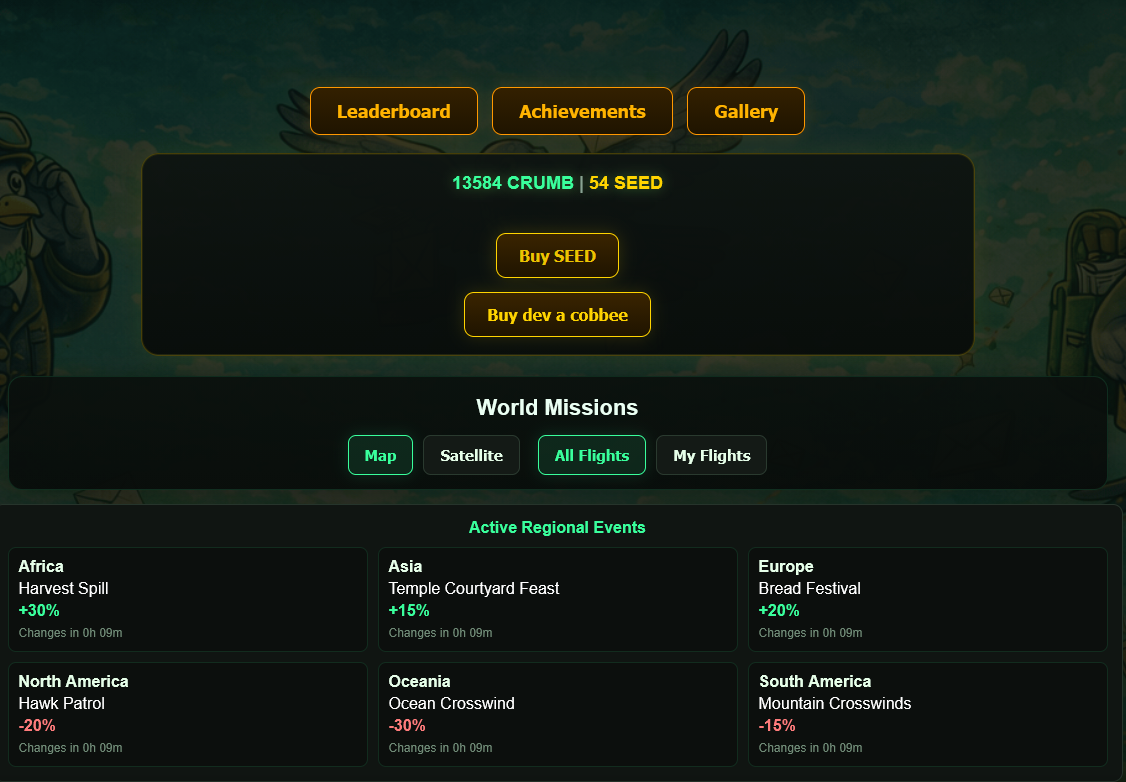
CRUMB and SEED balance bar
Displays your current balances and includes buttons to buy SEED or support the developer.
World Missions toolbar
Lets you switch between map and satellite view, and filter flights between all players or only your own flights.
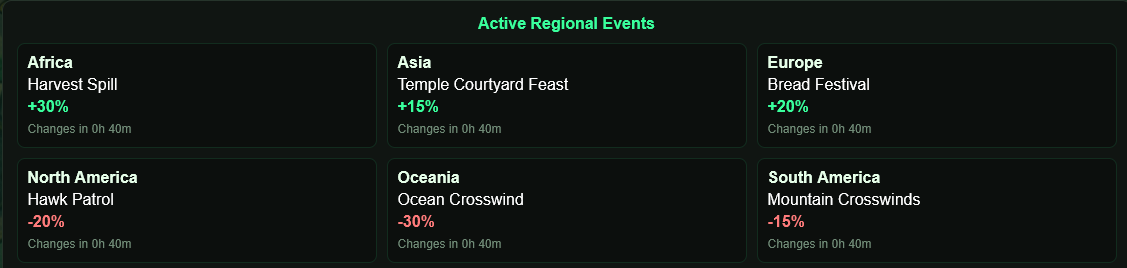
Active Regional Events
Shows the current positive or negative event affecting each region. These rotate automatically over time.
World map
Used to inspect cities, active flights, and choose a route by setting a departure city and destination city. The city network has been expanded with additional airports, including Tallinn.
Map Route Selection
Shows your currently selected departure and destination, and gives you quick buttons to choose a pigeon or clear the route.
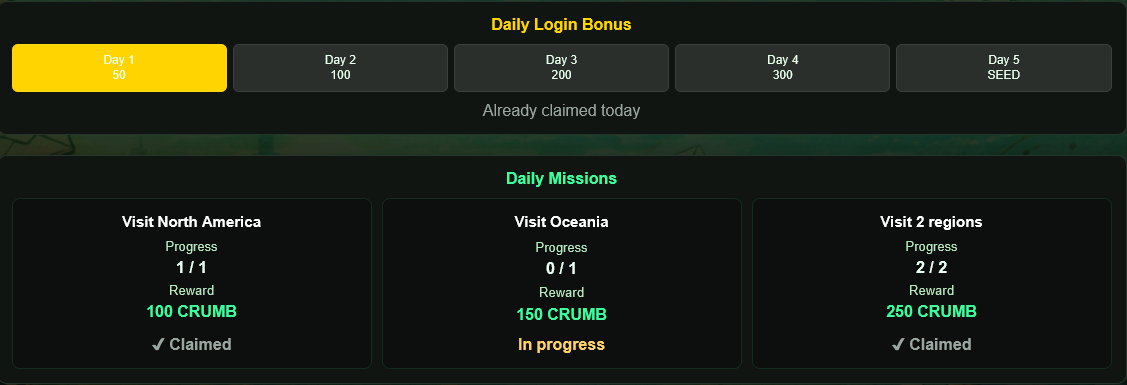
Daily Login Bonus
A recurring login reward track. You claim the daily reward and work toward bigger rewards across the streak cycle.
Daily Missions
Short objective-based tasks that give extra CRUMB when completed and claimed.
Weekly Missions
Harder weekly objectives reset every Monday and reward longer-term activity such as many flights, many destination cities, different regions, side missions, and long routes.
Cards block
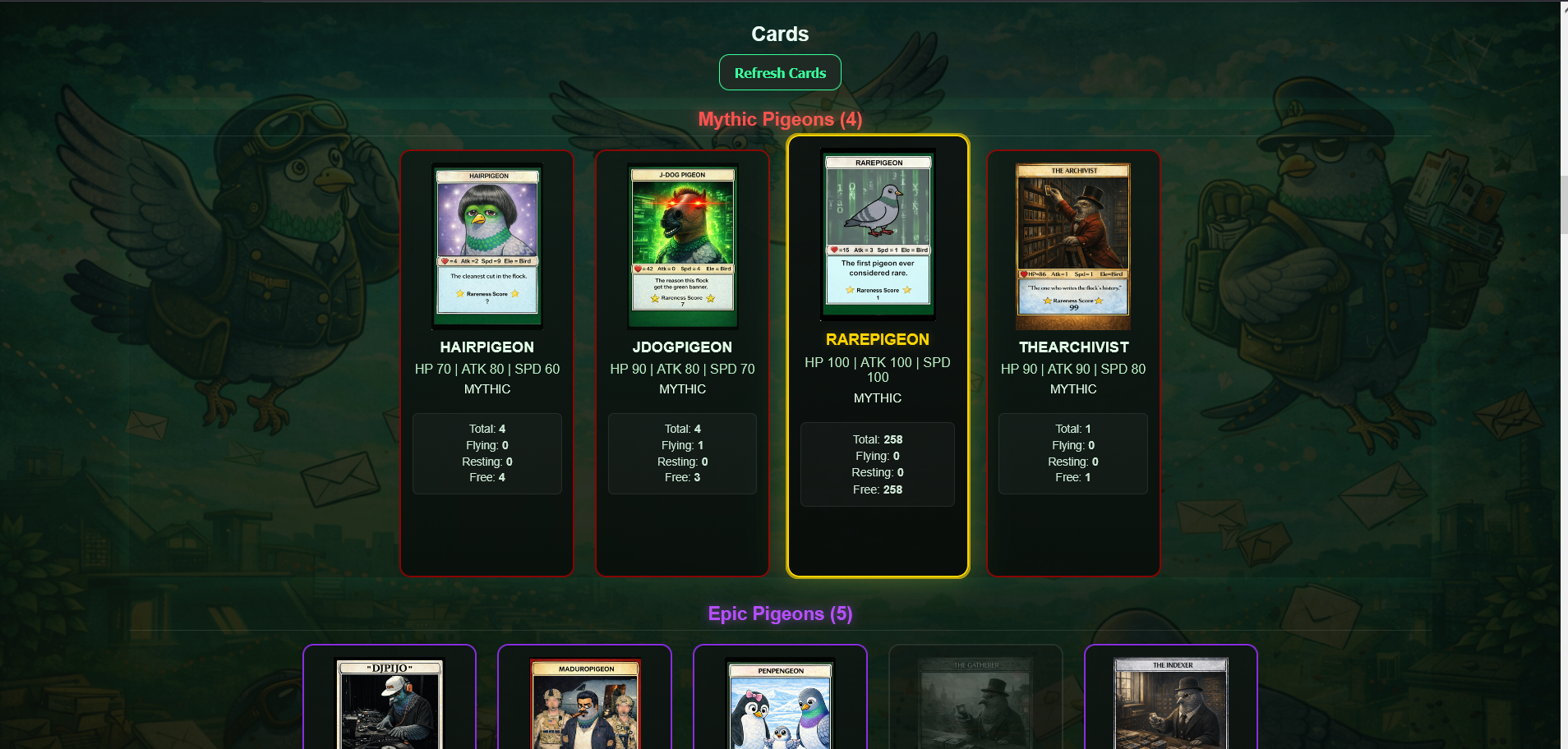
Your owned pigeons grouped by rarity. Each card shows its image, stats, and availability information.
Send Mission panel
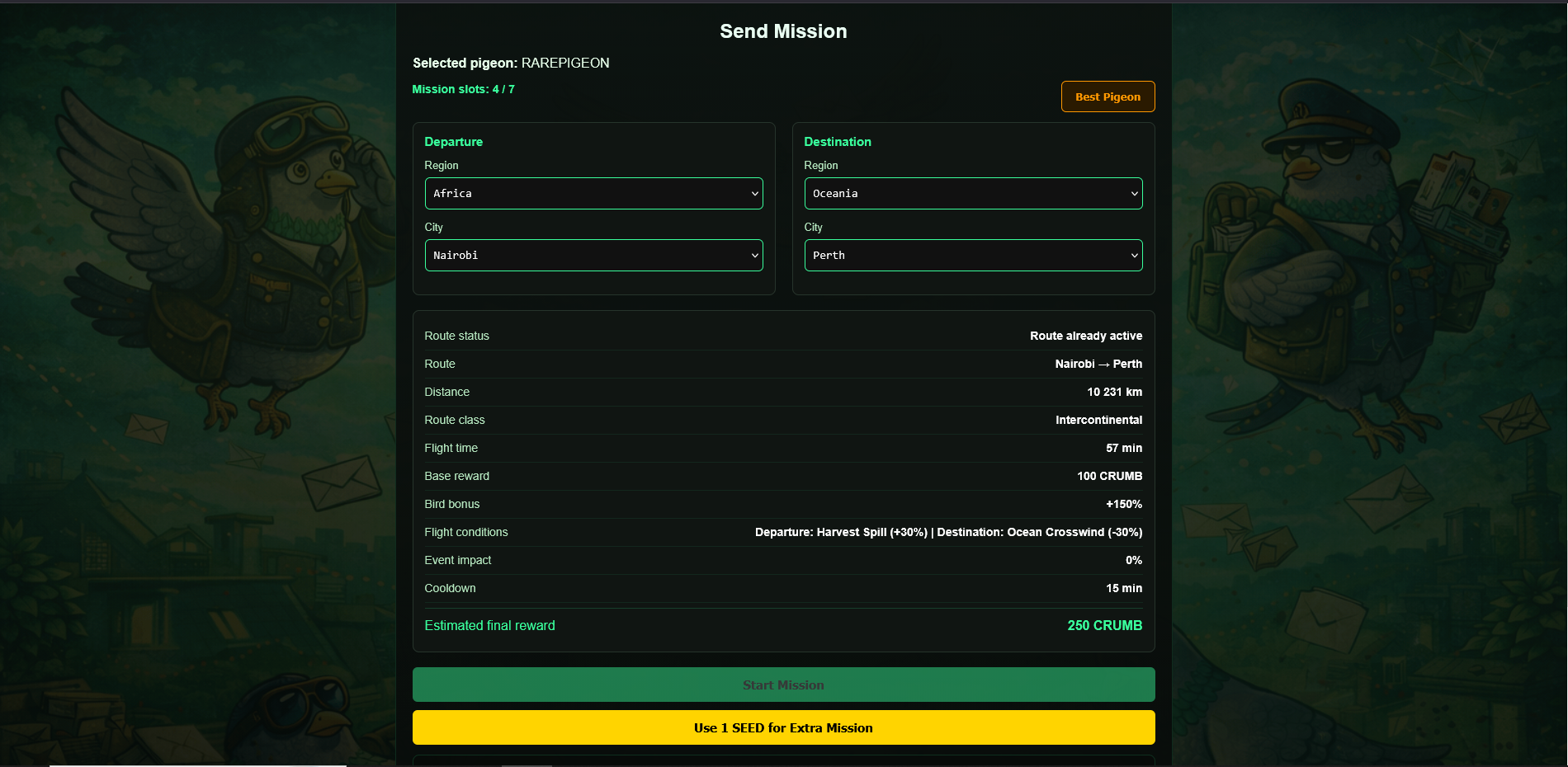
The core gameplay block. Here you select a route, see preview calculations, and launch either a normal mission or an extra SEED mission.
Active Missions / Recent Missions
Active Missions shows flights that are still running. Recent Missions shows completed flights and the rewards they paid out.
4. Cards and stats
Your Rare Pigeons are your playable units. Every mission uses one specific pigeon copy.
SPD
Speed. Higher SPD reduces flight time because the mission duration is calculated using route distance and pigeon speed.
ATK
Attack. ATK contributes to your pigeon multiplier and increases final CRUMB earned from a mission.
HP
Health. HP lowers cooldown pressure by reducing the base rest time after a mission.
Cards are grouped by rarity on the page: Mythic, Epic, Rare, and Common. This is a visual grouping only — the mission system ultimately depends on the stats and on route context.
4B. Card upgrades and grade balance
New accepted project cards enter the game as Common cards. Authors can request a permanent game-grade upgrade to Rare, Epic, or Mythic if the card supply and the current bottom-up grade balance allow it.
Starting point for new cards
- Every accepted project card can be added to the game as Common.
- New Common cards receive generated starter stats with HP + ATK + SPD = 80.
- Starter stats are always multiples of 5 and avoid extremes, so a new Common card will not start as 0 / 0 / 80.
- Common cards expand the base of the grade pyramid and can open more upgrade capacity above them.
Supply eligibility
- Mythic: asset supply must be 21 or less.
- Epic: asset supply must be 33 or less.
- Rare: asset supply must be 50 or less.
- Common: any accepted project card can enter here.
Upgrade fees
- Common → Rare: 4 PGNSACRIFICE or 60,000 COOCRUMB.
- Common/Rare → Epic: total Epic fee is 8 PGNSACRIFICE or 120,000 COOCRUMB.
- Common/Rare/Epic → Mythic: total Mythic fee is 16 PGNSACRIFICE or 240,000 COOCRUMB.
If a card is upgraded step by step, only the difference is paid. Example: Rare → Epic costs 4 extra PGNSACRIFICE or 60,000 extra COOCRUMB. Epic → Mythic costs 8 extra PGNSACRIFICE or 120,000 extra COOCRUMB.
Bottom-up grade balance
The target grade structure is based on:
The Gallery page calculates upgrade availability from the bottom up. A problem in an upper tier does not freeze lower-tier upgrades.
Direct upgrades are treated as step-by-step checks
A direct jump cannot bypass the pyramid.
- Common → Epic must pass both Common → Rare and Rare → Epic capacity checks.
- Rare → Mythic must pass both Rare → Epic and Epic → Mythic capacity checks.
- Common → Mythic must pass all three capacity checks.
Upgrade paths and priority protection
An author can declare a higher final goal when requesting an intermediate upgrade. Example: the current available step is Rare → Epic, but the final goal is Mythic.
- The current step is submitted and reserves its current slot immediately.
- After the admin approves the current step, the card moves to the new grade.
- If the declared final goal is still higher, the card enters a queued upgrade path.
- When the next step becomes valid by the bottom-up ratio, that step is reserved for the same card/author first.
- The priority window starts only at that moment, not at the original request date.
Approval flow
- The author submits an upgrade request from the Gallery page.
- The request reserves the current step immediately.
- The project admin checks the request and tells the author whether to proceed.
- The author completes the required PGNSACRIFICE or COOCRUMB action for the current step.
- The admin verifies the transaction, chooses final stats within the allowed range, and approves the current step.
- If the request has a higher final target, the remaining path is queued and protected by priority rules.
- After every approved step, the card grade and stats are updated in the game permanently.
Stats after upgrade
- Common: total stats = 80.
- Rare: total stats 105-140.
- Epic: total stats 155-180.
- Mythic: total stats 205-260.
The exact HP / ATK / SPD split is handled during approval inside the allowed total range. The project can reject obviously broken distributions that would damage gameplay balance.
5. Missions
Missions are the core gameplay loop.
- Select a route by choosing a departure city and destination city.
- Select a pigeon that is currently available.
- Check the mission preview.
- Launch the mission.
- Wait for the mission to finish and collect the reward automatically through the game flow.
What the mission preview shows
- Route status
- Route name
- Distance
- Route class
- Flight time
- Base reward
- Bird bonus
- Flight conditions
- Event impact
- Cooldown
- Estimated final reward
How rewards work
The game first determines a base reward from route distance. Then regional event modifiers are applied. Then the pigeon multiplier raises the final payout.
How flight time works
Flight duration depends on distance and the SPD value of the selected pigeon. Faster pigeons complete the same route more quickly.
How cooldown works
After a mission ends, the used copy enters a rest period. The cooldown is influenced by HP and mission duration. During this rest period, that copy cannot be used.
City-bound pigeons
When a pigeon finishes a mission, it remains in the destination city. The next mission for that exact copy must start from that city. When you select a pigeon, the departure city may be set automatically to the pigeon’s current city. If you had already selected another departure city, the game warns you when it changes the departure.
Side missions and risks
Each destination city can offer optional side missions. They rotate over time and can add a small reward bonus, but some of them carry cooldown risk.
- Regular Pigeon Post has no bonus and no extra risk.
- Side missions can add reward bonus up to about 15%.
- If a risk triggers, the game clearly shows the risk result and adds the listed cooldown penalty.
- Triggered risk messages are shown in red. Safe risk results are shown in green.
Mission slots
The number of standard missions you can run at the same time scales with the size of your collection. Bigger collections unlock more concurrent mission slots.
- 1–2 cards → 1 mission slot
- 3–4 cards → 2 mission slots
- 5–7 cards → 3 mission slots
- 8–11 cards → 4 mission slots
- 12–16 cards → 5 mission slots
- 17–24 cards → 6 mission slots
- 25+ cards → 7 mission slots
Standard missions
Use your normal mission slot capacity. This capacity grows as your owned pigeon count increases.
Extra missions
You can also launch extra missions by spending SEED, subject to the game’s extra mission cap.
6. Regional events
Regional events are live modifiers that change the value of flights. Every region can have an active positive or negative condition, and these conditions rotate over time.
- Events affect reward percentages.
- They can be positive or negative.
- They rotate every 6 hours.
- A route can be affected by departure-region conditions and destination-region conditions.
7. Daily rewards and streaks
Daily Login Bonus
Log in and claim the reward for the current day in the streak. The reward track escalates across the cycle and includes a SEED reward on the final day.
Daily Missions
Objective-based tasks that reward extra CRUMB. These may involve progress targets such as mission activity or other gameplay actions.
Daily missions must be completed and then claimed. If all daily missions are finished, the game can also present an additional bonus reward.
8. Economy: CRUMB and SEED
CRUMB
CRUMB is the main in-game reward currency.
- Earned from missions
- Earned from daily missions
- Earned from login bonuses
- Used as the main score currency for competitive play
SEED
SEED is a premium gameplay currency.
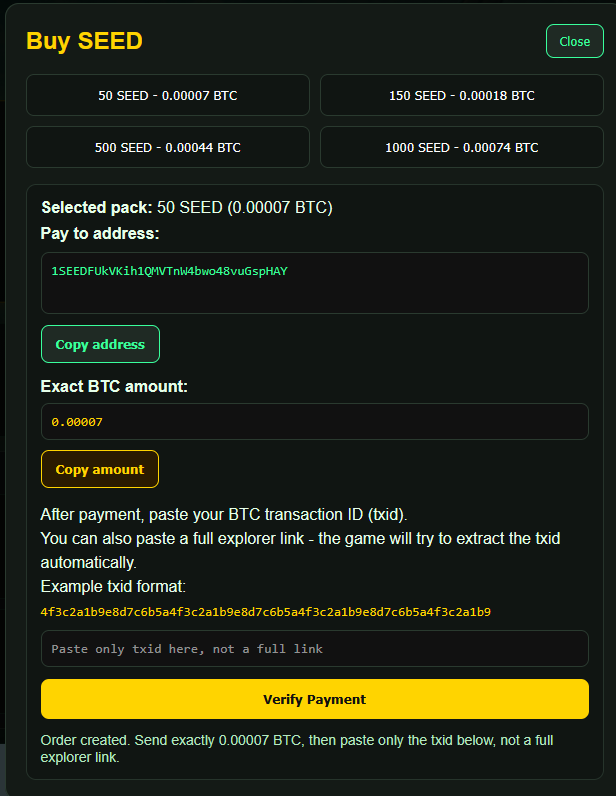
- Purchased with BTC through the in-game SEED shop flow
- Used to launch extra missions beyond standard slot capacity
- Also appears as part of the login streak reward cycle
9. COOCRUMB tokenomics
COOCRUMB is the external game token and a core part of the reward economy.
COOCRUMB
COOCRUMB is a Counterparty asset.
Total supply: 21,000,000,000
It is intended to be tradable on the DEX.
Leaderboard conversion
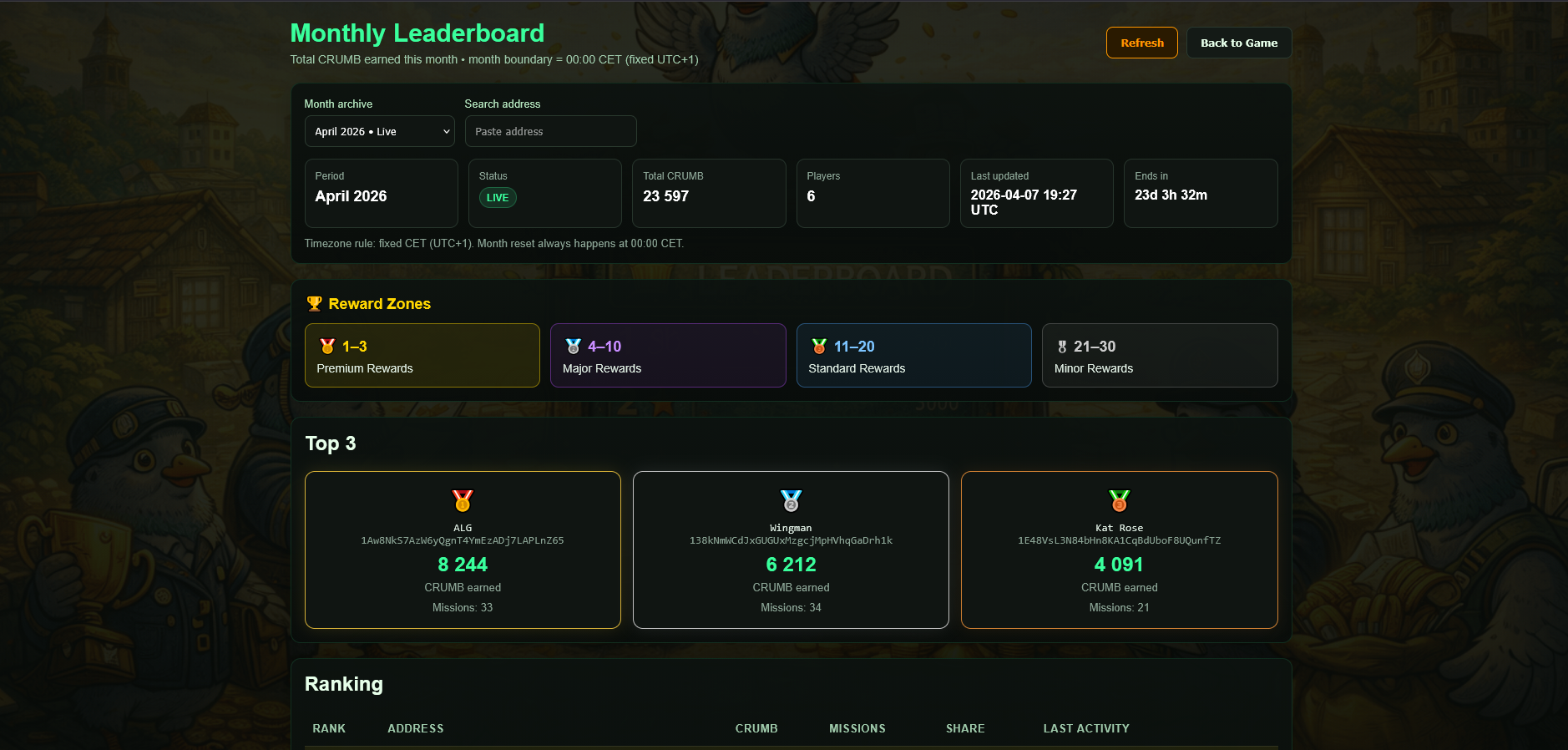
The first 30 players in the leaderboard receive prizes.
Their earned CRUMB becomes the base for the final COOCRUMB reward. A Card Bonus may increase the final COOCRUMB payout.
Playable card ownership
Monthly COOCRUMB rewards can be multiplied by a Card Bonus based on playable Rare Pigeons cards held by the player.
Buy cards with COOCRUMB
Selected cards will be listed for COOCRUMB. Players will be able to spend COOCRUMB to acquire them.
Burn mechanism
All COOCRUMB collected back through these card purchases will be burned.
1. Leaderboard rank is still simple.
Your monthly rank is based only on the CRUMB earned during the month. Card ownership does not move you up or down in the leaderboard.
2. After that, the game calculates a COOCRUMB Card Bonus.
The bonus uses the playable game cards currently cached for your wallet. The card list comes from the official Pigeon Post game card list.
3. Each asset gives Collection Points.
For one card asset, the game uses this formula:
Card Points = min(3, √N × √(50 / S_eff))
N = how many copies of this exact asset you hold.
S_eff = Effective Supply used only for the Card Bonus formula.
50 = baseline supply. A card with S_eff 50 gives 1 point for the first copy.
3 = maximum points one asset can give, no matter how many copies you hold.
How S_eff is chosen:
Usually, S_eff = real issued supply of the card. For example, if a card has supply 50, then S_eff is 50. If a card has supply 100, then S_eff is 100.
Some special cards may have a special Effective Supply. RAREPIGEON is the current special case: its real supply is 300, but for this formula its S_eff is 21, because it is treated as a special genesis/mythic game card. This does not change the blockchain supply; it is only a bonus formula setting.
4. Example for one normal card:
You hold 1 PENPENGEON, and its S_eff is 50.
√N = √1 = 1
√(50 / S_eff) = √(50 / 50) = √1 = 1
Card Points = 1 × 1 = 1.00 point
5. Example for one higher-supply card:
You hold 1 LFGSWARM, and its S_eff is 100.
√N = √1 = 1
√(50 / 100) = √0.5 ≈ 0.71
Card Points = 1 × 0.71 = 0.71 points
6. Example for RAREPIGEON:
You hold 2 RAREPIGEON. For the formula, S_eff is 21.
√N = √2 ≈ 1.41
√(50 / 21) ≈ 1.54
Card Points = 1.41 × 1.54 ≈ 2.17 points
7. Then all Collection Points are added together.
Example: 1 PENPENGEON gives 1.00 point and 1 LFGSWARM gives 0.71 points. Total Collection Points = 1.71.
8. Total points become the COOCRUMB multiplier.
K = min(1.50, 1 + Total Collection Points / 100)
Maximum Card Bonus is x1.50, reached at 50 Collection Points.
9. Final estimate:
Estimated COOCRUMB = Monthly CRUMB × K
Example: if you earned 10,000 CRUMB and your Card Bonus is x1.12, your estimated payout is 11,200 COOCRUMB.
10. Leaderboard rewards
The monthly leaderboard is the main competitive ranking system of the game.
- The higher you rank, the better your monthly outcome.
- The first 30 players receive rewards.
- Reward cards are ranked according to final placement.
- These reward cards will be announced separately each month.
- Reward cards will also be playable inside the game.
11. Achievements
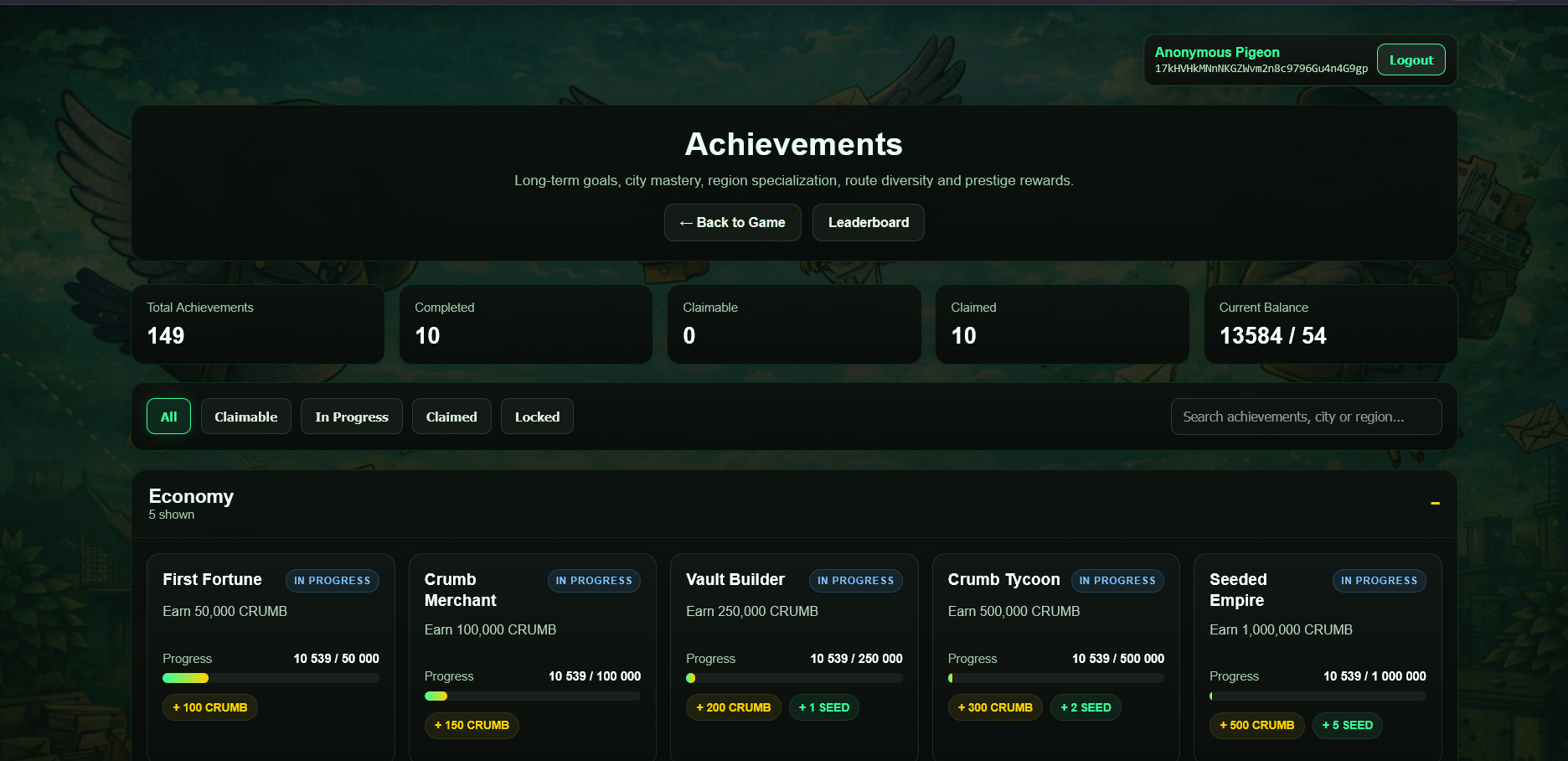
Achievements are milestone-based rewards that add another progression layer beyond missions, dailies, and leaderboard competition.
What are achievements?
Achievements are permanent progression goals unlocked through gameplay. They reward consistency, exploration, and long-term activity.
How they work
By completing specific milestones, you unlock achievements and can claim their rewards on the Achievements page.
Possible achievement categories
- Mission milestones
- Total CRUMB earned
- Collection milestones
- Special gameplay actions
- Event-based progression
Rewards
Achievements can grant CRUMB, SEED, and other progression rewards. Claimed rewards help accelerate your overall growth in the game.
12. Practical tips
Use “Best Pigeon”
If you already picked a route, the Best Pigeon button helps find the best available pigeon for that mission based on reward, time, and cooldown context.
Watch live events
Regional event changes can turn an average route into a strong one. Timing matters.
Manage copies smartly
Owning multiple copies of a strong pigeon gives you more flexibility because different copies can be in different states.
Don’t ignore daily systems
Daily missions and streak claims add extra value and can improve your total monthly result.
13. FAQ
Do I need Rare Pigeons cards to play?
Yes. The game reads the Rare Pigeons assets held by your logged-in address and uses those as your playable pigeons.
Can I use the same pigeon again immediately after a mission?
No. The used copy enters cooldown/rest after the mission ends.
Can the same route be launched multiple times at once?
No. If the route is already active, the game blocks a duplicate launch.
What is the difference between CRUMB and COOCRUMB?
CRUMB is the in-game reward currency used by the gameplay loop and leaderboard scoring. COOCRUMB is the Counterparty asset used for monthly reward distribution and token utility.
What can I do with SEED?
SEED lets you start extra missions beyond your standard mission slot capacity.
Why do event percentages matter so much?
Because event modifiers change the reward before the pigeon multiplier is applied, they can significantly affect the final payout.